Jump to section:

AXS Mobile ID More Info & FAQs

What is AXS Mobile ID?

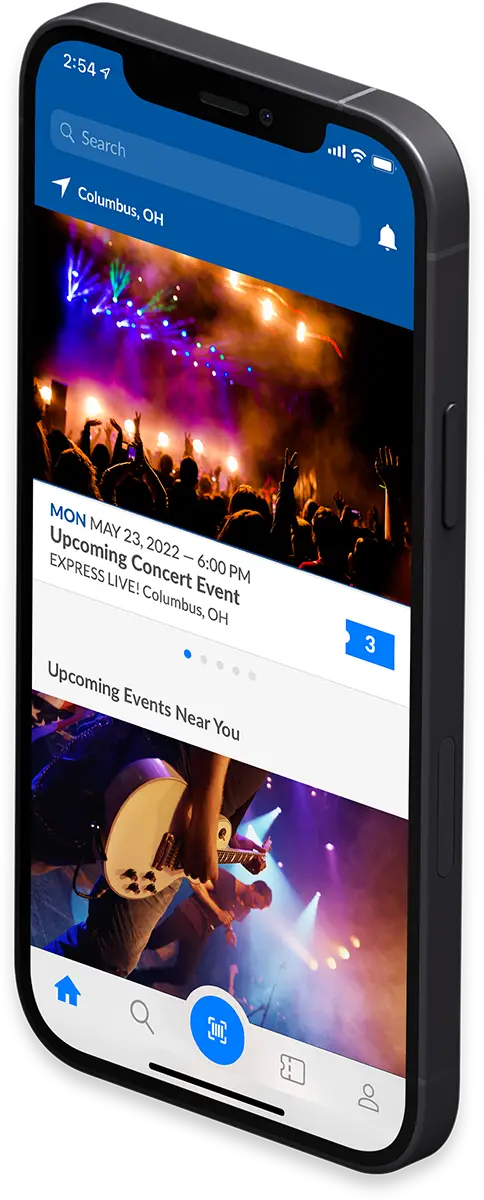
AXS Mobile ID is a digital ticketing system, with tickets assigned directly to fans attending. It eliminates paper tickets and allows you to enter events quickly with the scanning of the AXS or venue app. AXS Mobile ID allows you to manage your tickets digitally, with the option of transferring them easily amongst your party right up until show time.

Why is AXS Mobile ID being launched?

We’ve launched this brand new technology to give fans of live entertainment a faster and fairer ticketing experience. We’ve listened to customers asking for more to be done against unfair secondary ticketing practices and AXS Mobile ID tickets come equipped with a dynamically changing barcode system, which ensures that the tickets cannot be copied or shared illegally on any other websites, emphasising AXS’ ongoing commitment to combatting ticket scalpers.

First time using AXS Mobile ID?

Here's how to get started.

Download the AXS App

First, download the free AXS Tickets App: iOS | Android

Please note, if you already have the AXS App, please ensure it’s the most up to date version.

Watch Our Guide
X

Set Up Your AXS Account

Once installed, open the app and hit the main menu button. If you already have an AXS Account, you can sign in with your existing details. Otherwise, tap on CREATE ACCOUNT. Now that you've logged in, you can either purchase tickets or view previous purchases in YOUR TICKETS.

Watch Our Guide
X

Going in a Group? Transfer Tickets

Your mate's running late and you don't want to wait? You can transfer your tickets in an instant. Ticket recipients can enter the event using their own ticket, in their own time. No need to hang around or miss the start of the show!

Watch Our Guide
X

Get Scanned & Get In

Open up your ticket in the app and head to the entrance. Our friendly door staff will scan the digital barcode and you'll be inside in no time! AXS Mobile ID refreshes ticket barcodes every 59 seconds and works even without a wifi connection or a data signal. If you have any questions at the event, head straight to the venue’s Box Office where one of the team can help you.

Watch Our Guide
X

Further Info & FAQs

Getting Started

Your AXS account is your personal profile on AXS that keeps track of your events. It’s also the place for you to manage your log in credentials and social media connections as well as your Selling Info (if you sell your tickets on AXS).

You can also view and manage your tickets from your AXS account including the ability to Transfer or Share tickets for select events.

You can find your account on AXS.com or on the AXS App.

Visit AXS.com or the AXS App and click on ‘Sign Up’ at the top of the page. You will be asked to enter some basic account information. After completing the information, you are free to purchase tickets and manage them in your account. You can also register using the AXS mobile app. The mobile app is compatible with the latest versions of iOS and Android.

If you need to sign in, simply click the "Sign In" icon at the upper left-hand corner of AXS.com. You can sign in using your Facebook account or your AXS.com account.

If you need to sign out, hover over your name (this can also be found at the upper-left hand corner of your screen) and then select "Logout" from the drop-down menu.

AXS Mobile ID eliminates paper tickets and allows you to enter events with a quick scan of your ticket on an app. AXS Mobile ID allows you to manage your tickets digitally.

AXS Mobile ID allows for convenience, flexibility and security. Fans can manage tickets digitally and remain assured that all tickets are authentic and secure. The move to AXS Mobile ID is designed to put tickets in the hands of fans, not ticket scalpers.

You can reset your password either through the AXS App or at AXS.com. On either platform, click or tap “Sign In” then “Forgot password” and follow the steps to reset your password using the email address linked to your AXS account.

Via website:
Once logged in, select Your Account on the left-side navigation. You can edit your verification phone number, update your password, and edit payment methods.

Via AXS App:
If using the AXS App, click the person icon on the top right of your screen to access your account info. From the app, you can edit your verification phone number and change your password.

To alleviate the problems surrounding counterfeiting, all tickets are assigned to individuals via AXS Mobile ID. This includes a dynamically changing barcode system, which ensures that the tickets cannot be copied or shared illegally, emphasising AXS’ ongoing commitment to combatting ticket scalpers. By eliminating paper tickets fans are guaranteed easy entry to the venue, either as a group or individually, through simply scanning their app.

If the above has not answered a question for you, please contact us directly here.

Buying Tickets

Purchase tickets in a few easy steps! Before you start, make sure you have created an AXS account and downloaded the AXS App. Also have your credit or debit card handy, or if using PayPal, your login for PayPal ready to go.

Find your event on AXS.com or via the AXS App and simply click “Get Tickets”. The site or app will walk you through the steps to complete your purchase.

You will receive a confirmation of your ticket purchase via email and a second confirmation that your tickets are now available in your AXS Mobile ID (the AXS App).

For a smooth purchasing experience, you should have the below ready:

  • You’ve created an AXS account
  • You’re logged into your AXS account (either via website or via app)
  • Your debit card / credit card on hand, or PayPal login ready
  • If you have access to a pre-sale, make sure you have the code or link ready
  • Find your event and simply click “Get Tickets”

Pre-sales are a chance to purchase tickets before the general public has access. These special occasions are typically reserved as membership perks or fan loyalty programs. Most pre-sales require a special code in order to purchase tickets early and these codes are typically sent out to eligible fans leading up to the sale.

Access to a pre-sale does not guarantee tickets.

Passwords for pre-sales are often communicated directly to fans who are invited to participate. Some pre-sale passwords are sent by other entities like credit card companies, radio stations, and fan clubs.

For information on upcoming shows, including special pre-sale offers and more, sign up for our newsletter! To sign up, please create an account with us and update your Notification preferences.

On our busiest events, we add a virtual waiting room where fans can wait before the event goes onsale. The area typically opens 30 minutes before the onsale begins.

Here are a few things to know about the waiting room:

  • Stopping bots. We want fans like you to get the best tickets. The waiting room gives us an opportunity to filter out people who use technology to get the best seats and sell them for an inflated price.
  • Traffic control. The waiting room helps us get fans to the tickets as quickly as possible for the most popular events.
  • It’s not a queue! The waiting room is a holding area – getting there 30 minutes before is no different to joining 1 minute before.
  • Online only. We only have this waiting room online.
  • Don't refresh your screen. Once you are in the waiting room, it is best to wait. You’ll be processed through to the onsale as quickly as possible.

For popular shows, if there are any extra dates added, we will tell people in the waiting rooms first, giving them a link for the new show.

Please note that a place in the Waiting Room does not guarantee the availability of tickets!

If no tickets are found when you do a search, it means that at moment we do not have any available. For big releases, tickets are reserved very quickly. They are reserved for a limited time to allow customers with tickets in their 'baskets' to either complete the purchase or release the tickets.

If the purchase is completed, the ticket becomes unavailable and when this occurs for all tickets in a section, this section and price category will disappear or be crossed out from the purchase flow. If the purchase is not completed, the ticket will be released back into the system and be allocated to the next customer with a matching search.

When a lot of tickets are held in purchases that have not yet been completed, the tickets will not show up in a search because at the moment they are not available. However, the website will not state that they are sold out unless each and every ticket has been paid for.

Unfortunately, for some events the demand will exceed the supply.

A ticket limit can be set for an event to discourage unfair ticket buying practices. This ticket limit is posted during the buying process and is verified with every transaction.

Multiple accounts may not be used to exceed the ticket limits. This includes accounts or purchases with the same name, email address, billing address, credit card number or other information.

Concession or children’s ticket entitlements vary from event to event. Event organisers decide when or how to offer these entitlements. To find more information for each event, follow these steps:

  1. Open the relevant event page (either via the AXS website or AXS App
  2. Under Event Details section, there will be information specific to the event on age ranges, family policies and accessible seating.

To ensure tickets are available to as many people as possible, there may be a limit on the amount of time a fan can hold tickets before completing their purchase.

There is a timer at the top of every page in the checkout process that shows you how long you have to complete your purchase before the tickets in your cart are released for others to buy.

If the timer runs out before you have completed your booking, you will receive the message: "Out of time – we are sorry but the time to purchase your tickets has run out.” At this point, the tickets have been removed from your cart, and you will need to reload the page and try again to purchase tickets.

Your charge will be charged as soon as you make the booking. It can sometimes take a few days for it to show up on your statement and will mostly likely be shown as a pending payment in the meantime.

Buy Now, Pay in 4 is an excellent option if you want to make a large purchase more affordable by paying it off over time. Get what you want and split the payments into 4 installments over 6 weeks. Click here for more information.

Whenever you purchase tickets with AXS, you will receive an email notifying you of the various stages of the ticketing process, including delivery. Please ensure you check all inboxes (including spam or junk) for ticket and event information from us.

If you have made a mistake in your booking, please contact Customer Service here.

If the above has not answered a question for you, please contact us directly here.

Transferring on AXS Mobile ID

A ticket transfer allows you to give each guest in your party their own entry ticket digitally via AXS Mobile ID. They will receive a confirmation email to accept the transfer, and the tickets will automatically appear in their AXS App.

With ticket transfers, you no longer need to worry about delivering the paper tickets to them in advance or meeting them outside of the entrance to walk in together. There is no fee for transferring seats and you can make unlimited transfers.

Follow these simple steps to transfer tickets now.

No – AXS Mobile ID tickets include an anti-tout mechanism that ensures the tickets cannot be copied, as part of this, the bar code changes within the AXS App every 59 seconds.

You can transfer the tickets with them in a few easy steps.

There is no limit on how many times a ticket can be transferred.

You can select the transfer option in your account and send them the tickets directly.

There may be times where a block on transferability is requested by the promoter – if this happens, this will be marked clearly at purchase stage.

It depends on whether the guests you are transferring to already have an AXS Account. If they already have an account, the tickets are transferred instantaneously to their account, so you cannot cancel a transfer once you have initiated it. If the people you are transferring to do not have an AXS Account and do not pick up the tickets you have transferred, you can cancel a transfer.

If the above has not answered a question for you, please contact us directly here.

Attending the Event

Before heading to the event, check out our pre-event tips for a smooth entry!

  • Download the AXS App – this is your ticket to the event!
  • If you’ve purchased tickets for others, make sure you transfer tickets to them!
  • Make sure your phone is on local time!
  • Turn your brightness up on your phone for entry!
  • Enjoy the event!

With AXS Mobile ID, your one of a kind barcode gets you into the venue quickly.

Please have your AXS Mobile ID barcode displayed via the AXS or venue app when you approach the venue entrance, Wi-Fi is usually available at all entrances, but your ticket will work without wifi in place.

Please do the following:

  • Ensure you have the latest version of the app installed
  • Have your phone's date and time settings set to automatic
  • Screen is set to maximum brightness

Also - please do not take a screen shot of your ticket. For security, the bar codes changes every 59 seconds.

Show your AXS Mobile ID ticket to the Venue Staff who will scan it and admit you to the venue. Enjoy the show!

We completely understand your apprehension. The technology provided through the AXS App offers a secure and trusted ticketing experience. Any number of things can happen to PDF or paper tickets. When you use the AXS App, you get a revolving digital barcode that is not just a ticket, but is your identity and allows you to enter events with a simple yet secure scan. We hope you find the process easy and secure when it comes time for your event!

When you choose AXS Mobile ID as your ticket delivery method, you are choosing the secure and trusted technology provided through the AXS App. When you use the app, you get a revolving QR code that is not just a ticket - it's your event identity and works to eliminate ticket fraud and theft. This code allows you to enter events with a simple yet secure scan with or without an internet connection. We hope you find it easy to use!

If you do not have a smart phone or yours has run out of battery, please head to the venue box office with ID and booking confirmation.

Also, you can go to your AXS Account on a desktop computer and forward your tickets to a friend with a smart phone and enter with them.

Due the nature of the ticket and its barcode that changes every 59 seconds, it needs to be located in the AXS App.

Please visit the box office at the venue on the day or evening of the event.

Yes, to help ensure entry, please ensure your phone is set to the correct time zone.

A ticket transfer allows you to give each guest in your party their own entry ticket digitally via AXS Mobile ID. With ticket transfers, you no longer need to worry about delivering the paper tickets to them in advance or meeting them outside of the entrance to walk in together. There is no fee for transferring tickets, and you are able to make unlimited transfers.

This is done simply through the AXS App and can be done right up to the event (approximately one hour after door time).

If the above has not answered a question for you, please contact us directly here.

Accessibility

Accessible seats are seats or areas reserved for fans with disabilities and their companions.

Availability and type of accessible seating tickets will vary based on each venue’s policies and/or the type of event taking place. If you require additional information, you may want to contact the venue directly.

To arrange Accessible and Companion Card tickets please submit your request to AXS Customer Support via this form.

To process the booking, we will require the following details:

  • Patron details - Full name, contact number, email, postal address
  • Event details (Date - Location / Venue - Artist / Event)
  • Requirements for the number of tickets (e.g. 1 x Wheelchair + Companion or 2 x Accessible Seats)

An AXS Customer Support representative will process your request and confirm via email to arrange your purchase. A payment link will be sent to finalise the request and a confirmation email will be provided.

If the above has not answered a question for you, please contact us directly here.